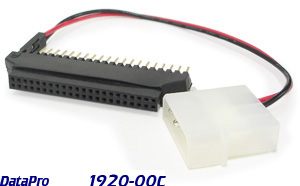
Recover data from old laptop hard drives, or integrate smaller storage into
space-limited assemblies with DataPro's no-hassle notebook to desktop hard drive
adaptor. This little unit is all you need to connect 2.5-inch laptop hard drives to a
standard desktop 40-pin IDE bus, for easy backup and data recovery.
1920-00C
Laptop IDE Hard Drive Adaptor
EACH
$
9.95
69 in stock
The DataPro 1920-series converts a laptop
hard drive to a standard desktop IDE bus.
The 2.5 inch connector adapts to a 3.5 inch
HDD connector, as used in the IDE bus system.
It is powered by a 5V Molex plug.
This allows the use of a notebook IDE hard
drive in a standard tower or desktop
PC on the 40-pin IDE cable (or 80-pin ATA).
This adaptor will not work for plugging
a standard IDE type hard drive into a
laptop drive controller, nor is it designed
for SATA drives (although it can be combined
with SATA/IDE converters).
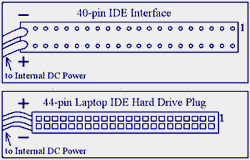
NOTE: It's important to properly
connect both ends of the adaptor to
ensure functionality and avoid
electrical shorts. When looking at
the back of the laptop drive, label side
up, the power cord of the adapter
should be on the left. The IDE cable
should connect with the key-notch up and
the red wire on the right.
(On the IDE interface end, the red wire
on the ribbon represents pin 1. On the
HDD, pin 1 should be labeled by the
drive's manufacturer. Pin 1 on the
converter is labeled on the unit.)
To enable easy installation and removal of hard drives, virtually all laptops
use adaptor clips that convert the universal 44-pin IDE connector to a snap-in
module. This snap-in is what lets the hard drive slip in and out of the laptop
case without the risk of breaking any IDE pins. If your laptop hard drive does
not have two rows of 22 pins each, like shark's teeth sticking out the back,
there is probably a laptop adaptor clip still attached.
To attach the 1920 IDE adaptor, you will first need to remove the contact clip
(it will pull straight away from the drive). After this has been pulled off, the
IDE pins will be revealed, and the 1920 adaptor can be installed.