In observance of Thanksgiving, DataPro will be closed on Thursday, November 27th. Orders placed after 12:00 PM PST on Wednesday, November 26th will be processed on Friday, November 28th, 2025.
In observance of Christmas, DataPro will be closed on Thursday, December 25th. Orders placed after 12:00 PM PST on Wednesday, December 24th will be processed on Friday, December 26th, 2026.
In observance of Christmas and New Years, DataPro will be closed on December 25th and January 1st. Orders placed after 12:00 PM PST on Wednesday, December 24th will be processed on Friday, December 26th, 2025, and orders placed after 12:00 PM PST on Wednesday, December 31st will be processed on Friday, January 2nd, 2026.
In observance of New Year’s Day, DataPro will be closed on Thursday, January 1st. Orders placed after 12:00 PM PST on Wednesday, December 31st will be processed on Friday, January 2nd, 2026.
In observance of Memorial Day, DataPro will be closed on Monday, May 25th. Orders placed after 12:00 PM PDT on Friday, May 22nd will be processed on Tuesday, May 26th, 2026.
In observance of Independence Day, DataPro will be closed on Friday, July 3rd. Orders placed after 12:00 PM PDT on Thursday, July 2nd will be processed on Monday, July 6th, 2026.
In observance of Labor Day, DataPro will be closed on Monday, September 7th. Orders placed after 12:00 PM PDT on Friday, September 4th will be processed on Tuesday, September 8th, 2026.
In observance of Thanksgiving, DataPro will be closed on Thursday, November 26th. Orders placed after 12:00 PM PST on Wednesday, November 25th will be processed on Friday, November 27th, 2026.
In observance of Christmas, DataPro will be closed on Friday, December 25th. Orders placed after 12:00 PM PST on Thursday, December 24th will be processed on Monday, December 28th, 2026.
In observance of New Year’s Day, DataPro will be closed on Friday, January 1st. Orders placed after 12:00 PM PST on Thursday, December 31st will be processed on Monday, January 4th, 2027.

DataPro
Login | Catalog | Contact | Support | Tech Info

CART Cart
 
DataPro International Inc.

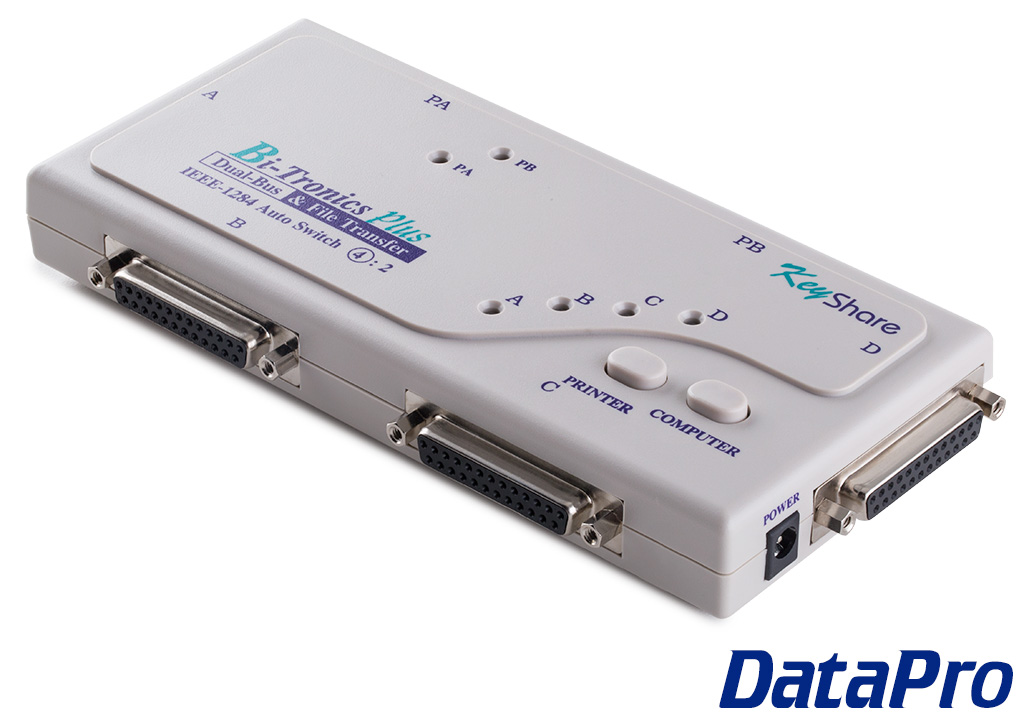
Parallel Printer Auto Switch


Categories:
> Parallel Electronics
Parallel Printer Auto Switch

 
This product allows multiple CPUs to share one parallel printer (or other parallel device) without the need for manual selection or sharing.  

Temporarily Unavailable Online

This product may have been transitioned to a newer version, or it may not yet be available online for other reasons.

For status, pricing, and alternative solutions, please contact our Sales department!

The 3220-series Auto Parallel Switches are electronic data switches which support Bi-Directional Centronics Parallel data transmission, including IEEE-1284 "nibble" mode.

This product allows multiple CPUs to share one parallel printer (or other parallel device) without the need for manual selection or sharing.

Automatic input selection is on a first-come, first-served basis. When one user is finished printing, the auto-switch waits for a period of time (adjustable from 5-60 seconds), then reverts to polling all input ports for activity.


Special Note for Really Really Really Old Computers:
Most Bi-Tronics (BiDirectional) auto switches support the two drivers HP LaserJet 5 provides, "Explorer" (under DOS) and "Status Window" (under Windows 3.1), but are not suitable to work in these two drivers.

In the old version of Explorer (provided with HP LaserJet 4), the user has to request the printer status manually. In the HP 5 version of Explorer and in Status Window, however, the CPU requests the printer status automatically whenever it is free; in case any odd situation occurs in the printer, it is shown on the monitor right away.

If the 3220 Parallel Auto-Switch unit is in use with the new version of Explorer or Status Window environment, two unexpected incidents will occur:

  1. When one PC is requesting the printer status, the printer is occupied for about one second. In the meantime, if another PC attempts to request the printer status, its request will not be accepted. Because this request is automatically performed by the CPU, it will often happen that while a user is using applications other than Explorer or Status Window, the user will surprisingly get a message on the monitor saying that the printer is offline or that the cable is disconnected.
  2. When one PC is sending its print job, it occupies the printer for a time. The other PC then gets a message on the monitor saying that the printer is off, or offline, or that the cable is disconnected.

The 3220 does support Explorer and Status Window, but the above two situations are unavoidable when either of these are active. Therefore, to avoid being disturbed by these messages, we suggest you use the switch in applications other than the newest versions of Explorer and Status Window.

To disable Explorer, comment out the STAT command in the autoexec.bat file.

To disable Status Window, close the Status Window application when in Windows.


Related Products:

Features:

  • Dual Channel
  • Full IEEE1284 compatible


Specifications:

  • Transfer rate of 2Mbps


Recently Viewed: